The No-Nonsense Guide to Variables and Memory in Rust
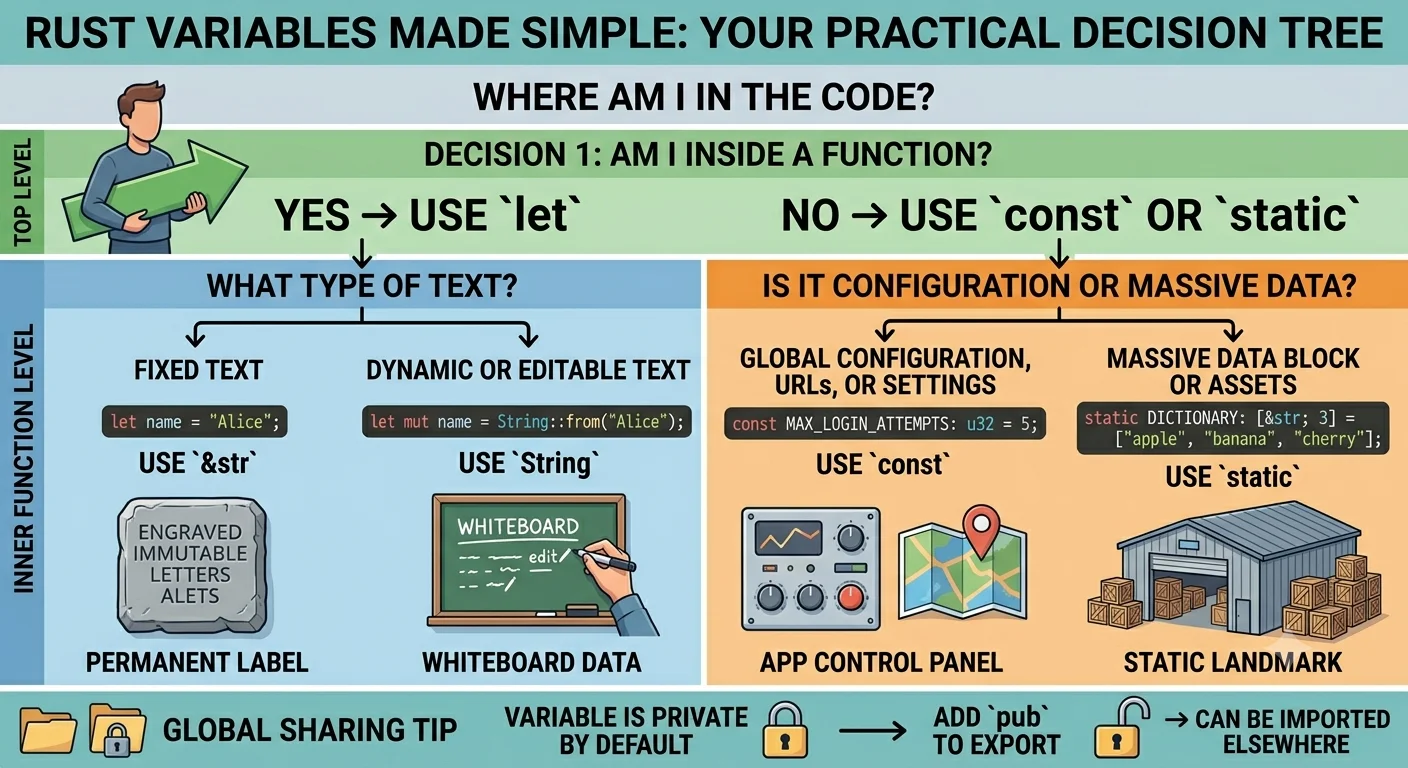
When you are writing Rust, it is easy to get overwhelmed by the different ways to create a variable. You have let, String::from(), const, and static.
If you try to memorize how the compiler handles memory addresses for all of them, your brain will melt. Instead, you just need a practical, real-world rulebook.
Here is exactly when to use what, based entirely on where you are in your code and what you are trying to build.
Part 1: You Are Inside a Function
Whenever you are writing code inside a function block (fn my_function() { ... }), your go-to keyword is always let. You only have to make one simple choice based on what kind of text you are dealing with.
Choice A: The text is permanent and unchanging
If you are hardcoding a quick label, a fixed status message, or a name that will never alter while the program runs, use a string slice (&str).
let name = "Alice";
- Why: This is lightning-fast. Rust bakes this text directly into the compiled app file. It takes zero time to set up or clean up.
Choice B: The text is dynamic or needs to change
If the text comes from the outside world (like a user typing into a prompt, a file read from the hard drive, or a database query), or if you need to edit the text later, use a String.
let mut name = String::from("Alice");
name.push_str(" Smith"); // Now it says "Alice Smith"
- Why: This allocates a flexible, temporary “whiteboard” in your computer’s memory. It allows you to append, delete, or rewrite characters on the fly. The moment your function ends, Rust automatically cleans this memory up.
Part 2: You Are Outside a Function (Global Control Panel)
Sometimes you need to create a variable at the very root level of your file—outside of any functions—so that multiple different functions can look at it. This is called the global scope.
Inside this space, let is forbidden. Instead, you choose between const and static.
Choice A: Global Settings and URLs (Use const)
If you are defining a global configuration value, a timeout limit, or a base URL that your whole app needs to know about, use const. (Note: Rust requires const names to be UPPERCASE).
const MAX_LOGIN_ATTEMPTS: u32 = 5;
const API_BASE_URL: &str = "https://api.example.com";
- Why: Think of
constas a compiler shortcut. Every time you useMAX_LOGIN_ATTEMPTSdown in your code, the compiler physically copies and pastes the number5into that line before building the final app. It acts as a clean control panel at the top of your file.
Choice B: Giant Data Blocks and Files (Use static)
If you are outside a function and you need to embed a massive piece of data directly into the app—like a 2-megabyte lookup dictionary, an array of thousands of items, or a raw image asset—use static.
static WORDS_DICTIONARY: [&str; 3] = ["apple", "banana", "cherry"];
- Why: Because this data is huge, you do not want the compiler copying and pasting it everywhere.
staticforces the compiler to give this data one single, permanent, unmoving home in memory. Every function safely looks at the exact same location.
Part 3: Sharing Across Files (The pub Unlocking)
By default, everything you create at the top of a file is completely private to that file. If you have a second file (like auth.rs) that needs to use your global configurations, you have to unlock the door.
You do this by adding the pub (public) keyword in front of your const or static:
// In src/config.rs
pub const MAX_LOGIN_ATTEMPTS: u32 = 5;
pub static BRAND_NAME: &str = "Acme Corp";
Now, any other file in your project can cleanly import and use them:
// In src/auth.rs
use crate::config::{MAX_LOGIN_ATTEMPTS, BRAND_NAME};

fn show_screen() {
    println!("Welcome to {}, you have {} tries.", BRAND_NAME, MAX_LOGIN_ATTEMPTS);
}
The Ultimate Decision Tree
When you go to type a variable, look at this visual checklist to know exactly what to do:
-
Inside a function?
- Fixed text —>
let name = "Alice"; - Dynamic/Editable text —>
let mut name = String::from("Alice");
- Fixed text —>
-
Outside a function?
- App settings/URLs —>
const API_URL: &str = "..."; - Massive data/Assets —>
static DATA: [u8; 1000] = [...];
- App settings/URLs —>
If you follow these rules, your code will always be highly optimized, perfectly organized, and exactly what the Rust compiler expects.