React Redux vs Context API

In large applications one of the main decisions that has to be made is what tools to use for application state management. Here compare Redux and Context.
Create the react app
npx create-react-app redux-vs-contextInstall Redux stuff
npm install @reduxjs/toolkit react-reduxTo do a proper comparison we need to run the a Context App and a Redux App Side by side. We’ll build an app which display 2 counters. All counters are updated from one component but displayed in different components.
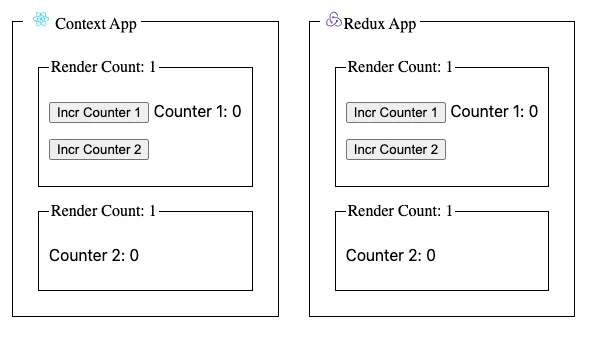
As you increment the counters we’ll track the render counts of the different boxed components.
let’s start with creating an index.js file for our investigation
import React from 'react';
import ReactDOM from 'react-dom/client';
import ContextApp from './ContextApp';
import ReduxApp from './ReduxApp';
import Box from './components/Box';
import './style.css';

const root = ReactDOM.createRoot(document.getElementById('root'));

root.render(
  <div className="container">
    <Box title={'CONTEXT'}>
      <ContextApp />
    </Box>
    <Box title={'REDUX'}>
      <ReduxApp />
    </Box>
  </div>
);
Let’s start with creating the Context Application
Create an application context
For our Context app we need an application context
//app-context.js
import React, { useState, createContext } from 'react';

const intialValue = {
  counter1: 0,
  incrementCounter1: () => {},
  incrementCounter2: () => {},
};

export const AppContext = createContext(intialValue);

export function AppContextProvider({ children }) {
  const [state, setState] = useState({ counter1: 0, counter2: 0 });

  function incrementCounter1() {
    setState({ ...state, counter1: state.counter1 + 1 });
  }

  function incrementCounter2() {
    setState({ ...state, counter2: state.counter2 + 1 });
  }

  console.log('Context State: ' + JSON.stringify(state));
  return (
    <AppContext.Provider
      value={{
        counter1: state.counter1,
        counter2: state.counter2,
        incrementCounter1,
        incrementCounter2,
      }}
    >
      {children}
    </AppContext.Provider>
  );
}

export default AppContextProvider;
This file contains all things to setup application state and list all the operations (incrementCounter1, incrementCounter2) to change that state. More on React Context go to https://reactjs.org/docs/context.html
To use this context we have to wrap our application in the AppContextProvider. This gives children (App and Counter2) access to the context value if needed.
import React from 'react';
import App from './App';
import Counter2 from './Counter2';
import AppContextProvider from './context/app-context';

export default function ContextApp() {
  return (
    <AppContextProvider>
      <App />
      <Counter2 />
    </AppContextProvider>
  );
}
To access that context we need to use the hook useContext in the child components
//App.js
import React, { useContext } from 'react';
import Box from '../components/Box';
import { AppContext } from './context/app-context';
let renderCount = 0;
function App() {
  const { counter1, incrementCounter1, incrementCounter2 } =  useContext(AppContext);

  renderCount++;
  return (
    <Box title={`Render Count: ${renderCount}`}>
      <p>
        <button className="button" onClick={incrementCounter1}>
          Incr Counter 1
        </button>{' '}
        Counter 1: {counter1}
      </p>
      <p>
        <button className="button" onClick={incrementCounter2}>
          Incr Counter 2
        </button>
      </p>
    </Box>
  );
}

export default App;
//Counter2.js
import React, { useContext } from 'react';
import Box from '../components/Box';
import { AppContext } from './context/app-context';
let renderCount = 0;
function Counter2() {
const { counter2 } = useContext(AppContext);
renderCount++;
return (
<Box title={`Render Count: ${renderCount}`}>
<p>Counter 2: {counter2}</p>
</Box>
);
}
export default Counter2;Note: the renderCount variable exist to track how many times the component renders when operations are invoked
Let’s do the same for the Redux Application
Create a Redux Store
//store.js
import { configureStore } from '@reduxjs/toolkit';
import counter1 from './counter1';
import counter2 from './counter2';

export const store = configureStore({
  reducer: {
    counter1,
    counter2,
  },
});
Create Reducers for each counter
//counter1.js
import { createSlice } from '@reduxjs/toolkit'

const initialState = {
    value: 0,
}

export const counter1Slice = createSlice({
    name: 'counter1',
    initialState,
    reducers: {
        incrementCounter1: (state) => {
            state.value += 1
        }
    },
})

export const { incrementCounter1 } = counter1Slice.actions

export default counter1Slice.reducer
//counter2.js
import { createSlice } from '@reduxjs/toolkit';
const initialState = {
value: 0,
};
export const counter2Slice = createSlice({
name: 'counter2',
initialState,
reducers: {
incrementCounter2: (state) => {
state.value += 1;
},
},
});
export const { incrementCounter2 } = counter2Slice.actions;
export default counter2Slice.reducer;
To use the store we need to wrap our application inside a redux provider
import React from 'react';
import App from './App';
import Counter2 from './Counter2';
import { store } from './redux/store';
import { Provider } from 'react-redux';

export default function ReduxApp() {
  return (
    <Provider store={store}>
      <App />
      <Counter2 />
    </Provider>
  );
}
To access that store and dispatch operations we need to use the useSelector and useDispatch hooks from react-redux lib
//App.js
import React from 'react';
import { useSelector, useDispatch } from 'react-redux';
import Box from '../components/Box';
import { incrementCounter1 } from './redux/counter1';
import { incrementCounter2 } from './redux/counter2';

let renderCount = 0;
function App() {
  const counter1 = useSelector((state) => state.counter1.value);
  const dispatch = useDispatch();

  renderCount++;
  return (
    <Box title={`Render Count: ${renderCount}`}>
      <p>
        <button
          className="button"
          onClick={() => dispatch(incrementCounter1())}
        >
          Incr Counter 1
        </button>{' '}
        Counter 1: {counter1}
      </p>
      <p>
        <button
          className="button"
          onClick={() => dispatch(incrementCounter2())}
        >
          Incr Counter 2
        </button>
      </p>
    </Box>
  );
}

export default App;
//Counter2.js
import React from 'react';
import { useSelector } from 'react-redux';
import Box from '../components/Box';
let renderCount = 0;
function App() {
const counter2 = useSelector((state) => state.counter2.value);
renderCount++;
return (
<Box title={`Render Count: ${renderCount}`}>
<p>Counter 2: {counter2}</p>
</Box>
);
}
export default App;
Render Count Comparision
When running the Redux app, re-renders only happens when the selected state slice is updated.
Counter 2 is only re-rendered when the state of counter2 is updated. At the same time other parts that are not watching counter2 are not re-rendered
In the Context App, all components are re-rendered when the context value is updated.
All parts of the application using the context are re-rendered if any piece of the state is updated
Conclusion
Use context for static global state and Redux for global state that changes often.
Play around with the app: