How to Build a React Autocomplete component
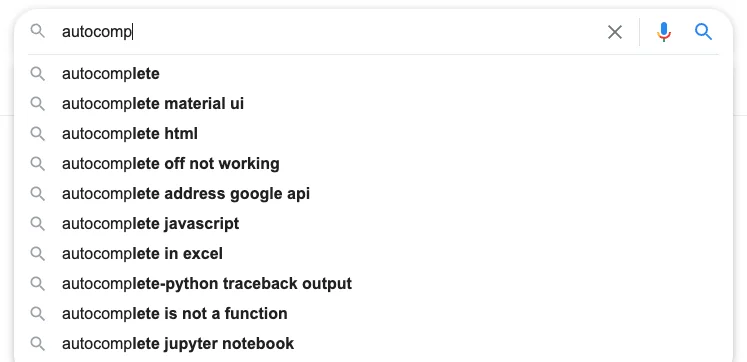
Autocomplete or word completion works so that when the writer writes the first letter or letters of a word, the program predicts one or more possible words as choices. If the word he intends to write is included in the list he can select it.
What will follow is my attempt to build an autocomplete component only using React and custom React hooks.
We would like our autocomplete to do the following:
- Style Input and Option List
- Static source
- Remote source
- Scrollable results
- Keyboard navigation
- Jump to first option
- Jump to last option
- Select option on enter or mouse click
let’s create the UI component
import React, { useRef, useState } from 'react'
import { HiSearch, HiUser } from 'react-icons/hi'
import useAutoComplete from './custom-hooks/use-autocomplete'

const Options = [
    { value: "1", label: "John" },
    { value: "2", label: "Jack" },
    { value: "3", label: "Jane" },
    { value: "4", label: "Mike" },
]

export default function Home() {

     const { bindInput, bindOptions,  bindOption, isBusy, suggestions, selectedIndex} = useAutoComplete({
        onChange: value => console.log(value),
        source: (search) => Options.filter(option => new RegExp(`^${search}`, "i").test(option.label))
    })

       return (
        <div className="p-2 border" >
            <div className="flex items-center w-full">
                <HiSearch />
                <input
                    placeholder='Search'
                    className="flex-grow px-1 outline-none"
                    {...bindInput}
                />
                {isBusy && <div className="w-4 h-4 border-2 border-dashed rounded-full border-slate-500 animate-spin"></div>}
            </div>
            <ul {...bindOptions} className="w-[300px] scroll-smooth absolute max-h-[260px] overflow-x-hidden overflow-y-auto" >
                {
                    suggestions.map((_, index) => (
                        <li
                            className={`flex items-center h-[40px] p-1 hover:bg-slate-300 ` + (selectedIndex === index && "bg-slate-300")}
                            key={index}
                            {...bindOption}
                        >
                            <div className="flex items-center space-x-1">
                                <HiUser />
                                <div>{suggestions[index].label}</div>
                            </div>
                        </li>
                    ))
                }
            </ul>
        </div>
    )
}
As can be seen, all the styling and layout is done here. The functionality of the input, option list (ul), and options (li) are delegated to the custom hook through the objects bindInput, bindOptions, and bindOption
import React, { useRef, useState } from 'react'

const KEY_CODES = {
    "DOWN": 40,
    "UP": 38,
    "PAGE_DOWN": 34,
    "ESCAPE": 27,
    "PAGE_UP": 33,
    "ENTER": 13,
}


export default function useAutoComplete({ delay = 500, source, onChange }) {

    const [myTimeout, setMyTimeOut] = useState(setTimeout(() => { }, 0))
    const listRef = useRef()
    const [suggestions, setSuggestions] = useState([])
    const [isBusy, setBusy] = useState(false)
    const [selectedIndex, setSelectedIndex] = useState(-1)
    const [textValue, setTextValue] = useState("")

    function delayInvoke(cb) {
        if (myTimeout) {
            clearTimeout(myTimeout)
        }
        setMyTimeOut(setTimeout(cb, delay));
    }

    function selectOption(index) {
        if (index > -1) {
            onChange(suggestions[index])
            setTextValue(suggestions[index].label)
        }
        clearSuggestions()
    }

    async function getSuggestions(searchTerm) {
        if (searchTerm && source) {
            const options = await source(searchTerm)
            setSuggestions(options)
        }
    }

    function clearSuggestions() {
        setSuggestions([])
        setSelectedIndex(-1)
    }

    function onTextChange(searchTerm) {
        setBusy(true)
        setTextValue(searchTerm)
        clearSuggestions();
        delayInvoke(() => {
            getSuggestions(searchTerm)
            setBusy(false)
        });
    }


    const optionHeight = listRef?.current?.children[0]?.clientHeight

    function scrollUp() {
        if (selectedIndex > 0) {
            setSelectedIndex(selectedIndex - 1)
        }
        listRef?.current?.scrollTop -= optionHeight
    }

    function scrollDown() {
        if (selectedIndex < suggestions.length - 1) {
            setSelectedIndex(selectedIndex + 1)
        }
        listRef?.current?.scrollTop = selectedIndex * optionHeight
    }

    function pageDown() {
        setSelectedIndex(suggestions.length - 1)
        listRef?.current?.scrollTop = suggestions.length * optionHeight
    }

    function pageUp() {
        setSelectedIndex(0)
        listRef?.current?.scrollTop = 0
    }

    function onKeyDown(e) {

        const keyOperation = {
            [KEY_CODES.DOWN]: scrollDown,
            [KEY_CODES.UP]: scrollUp,
            [KEY_CODES.ENTER]: () => selectOption(selectedIndex),
            [KEY_CODES.ESCAPE]: clearSuggestions,
            [KEY_CODES.PAGE_DOWN]: pageDown,
            [KEY_CODES.PAGE_UP]: pageUp,
        }
        if (keyOperation[e.keyCode]) {
            keyOperation[e.keyCode]()
        } else {
            setSelectedIndex(-1)
        }
    }

    return {
        bindOption: {
            onClick: e => {
                let nodes = Array.from(listRef.current.children);
                selectOption(nodes.indexOf(e.target.closest("li")))
            }
        },
        bindInput: {
            value: textValue,
            onChange: e => onTextChange(e.target.value),
            onKeyDown
        },
        bindOptions: {
            ref: listRef
        },
        isBusy,
        suggestions,
        selectedIndex,
    }
}
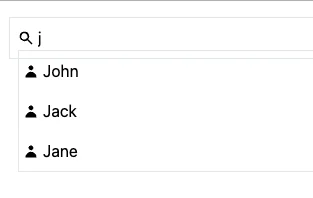
Lastly, the autocomplete component will be able to work with a remote source simply by changing the source and optionally setting a delay so that the remote source is only called after keyboard typing delay:
     const { bindInput, bindOptions,  bindOption, isBusy, suggestions, selectedIndex} = useAutoComplete({
        onChange: value => console.log(value),
        delay: 1000,
        source: async (search) => {
            try {
                const res = await fetch(`${process.env.apiBase}/user/search?q=${search}`)
                const data = await res.json()
                return data.map(d => ({ value: d._id, label: d.name }))
            } catch (e) {
                return []
            }
        }
    })