Crafting JS Applications with JSDoc and TypeScript

There are mixed feelings about using a dynamically typed language like JavaScript when building larger applications. I’m not here to fight for JavaScript over Typescript. I will though illustrate how we can write clean JavaScript and use Typescript to assist us in doing so.
When designing a system, the use of a dynamic functional language allows you to concentrate on the structure, flow and data. The designs seem to become simpler to reason about. Noise of classes, types, inheritance dissappers, and we can concentrate on what needs to be done.
Everyone has to write or read JavaScript on some point in their life so in this post I will discuss how we can use it with Typescript and JSDoc to help architect a system.
As clean developers we are trained that comments are bad and that your code should explain your intention and using comments indicates the code is not clear enough.
But not all comments are bad ;)
Enter JSDoc :- JSDoc is a markup language used to annotate JavaScript source code files.
We’re not going to use JSDoc to document our code, but rather to help with code types and hence code completion and type checking.
I use Visual Studio Code, which includes built-in JavaScript IntelliSense out of the box (many other IDEs do the same). VS Code understands many standard JSDoc annotations, and uses these annotations to provide rich IntelliSense. We’ll use the type information from JSDoc comments to type check your JavaScript.
Let’s start with a simple example:
function getInfo(birthYear, name) {
    const currentYear = new Date().getFullYear()
    return `My name is ${name.toUpperCase()}, I am approx ${currentYear - birthYear} years old`
}
The above code is simple: it defines a function, getInfo, that takes in a birthYear and name and returns a message. Simple JavaScript, no types, However, when calling the function we need to figure out what types the inputs are based on how they are used in the function.

In JavaScript there are 2 ways of doing this. One is to infer type be supplying defaults and the other is to use JSDoc
function getInfo(birthYear = 0, name = "") {
    const currentYear = new Date().getFullYear()
    return `My name is ${name.toUpperCase()}, I am approx ${currentYear - birthYear} years old`
}
/**
* @param {number} birthYear
* @param {string} name
* @returns {string}
*/
function getInfo(birthYear, name) {
const currentYear = new Date().getFullYear()
return `My name is ${name.toUpperCase()} and I am approx ${currentYear - birthYear} years old`
}Now when we write the calling code of this function, it’s more informative
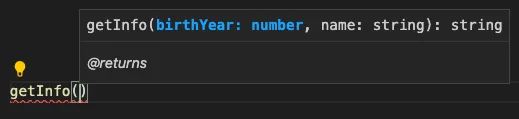
Let’s do another example
/**
 * @param {number} birthYear
 * @param {string} name
 * @returns {Person}
 */
function createPerson(birthYear = 0, name = "") {
    const currentYear = new Date().getFullYear()
    return {
        name: name.toUpperCase(),
        age: currentYear - birthYear
    }
}
Here we return a Person type. So where and how do we define this Person type?
We can create a types.d.ts file to keep some or all of our types. This file can be stored anywhere and named anything:
//types.d.ts
export interface Person {
    name: string,
    age: number
}
We use the typedef import statement to import the type
/**@typedef {import('./types').Person} Person */

/**
 * @param {number} birthYear
 * @param {string} name
 * @returns {Person}
 */
function getInfo(birthYear = 0, name = "") {
    const currentYear = new Date().getFullYear()
    return {
        name: name.toUpperCase(),
        age: currentYear - birthYear
    }
}
Last example. We’d like to define a Product Repository
//types.d.ts
export interface Product {
    name: string,
    price: number
}


export interface ProductRepository {
    getProducts: () => Promise<Product[]>
    getProduct: (id: number) => Promise<Product>
    deleteProduct: (id: number) => Promise<boolean>
    createProduct: (name: string, price: number) => Promise<Product>
}


export interface ProductDataSource {
    getDBProducts: () => Promise<Product[]>
    getDBProduct: (id: number) => Promise<Product>
    deleteDBProduct: (id: number) => Promise<boolean>
    createDBProduct: (name: string, price: number) => Promise<Product>
}


export interface NotificationService {
    notify: (message: string) => Promise<boolean>
}
Now let’s create the implementation
/**@typedef {import('./types').ProductRepository} ProductRepository */
/**@typedef {import('./types').ProductDataSource} ProductDataSource */
/**@typedef {import('./types').NotificationService} NotificationService */


/**
 *
 * @param {{dataSource: ProductDataSource, notificationService: NotificationService}} dependencies
 * @returns {ProductRepository}
 */
const ProductRepositoryImpl = ({ dataSource, notificationService }) => ({

    async getProducts() {
        const result = await dataSource.getDBProducts()
        return result

    },

    async createProduct(name, price) {
        const result = dataSource.createDBProduct(name, price);
        await notificationService.notify("Product Created")
        return result

    },

    async deleteProduct(id) {
        const result = dataSource.deleteDBProduct(id)
        await notificationService.notify("Product Deleted")
        return result

    },


    async getProduct(id) {
        const result = dataSource.getDBProduct(id)
        return result

    }

})
Here we create a Product Repository Implementation with data source and notification service dependencies injected through the inputs. The higher-order function then returns an object of type ProductRepository
Summary
By simply providing enough JSDoc, will give us intelli-sense and type checking across all our JS files, while still keeping code clean and focused