Clean MVVM with React and React Hooks

To cleanly develop and test our application, we would like to test all logic including that in the graphical user interface. To do this, we have to extract all GUI logic from the view into a view model which can be tested and developed in isolation.
I will illustrate a Clean architecture inspired approach to doing this.
Let’s create a simple application of which one of its features is to manage a list of Products
- List products
- Create a product
- Delete an existing product
- Update an existing product
To get a visual idea of our Product management feature. Let’s use wire framing:
Wire framing is an important communication tool in any app project. It gives the client and developer an opportunity to walk through the structure of the application without getting distracted by design implementations.
Our application will have the following User Interface Screens for Product Management:
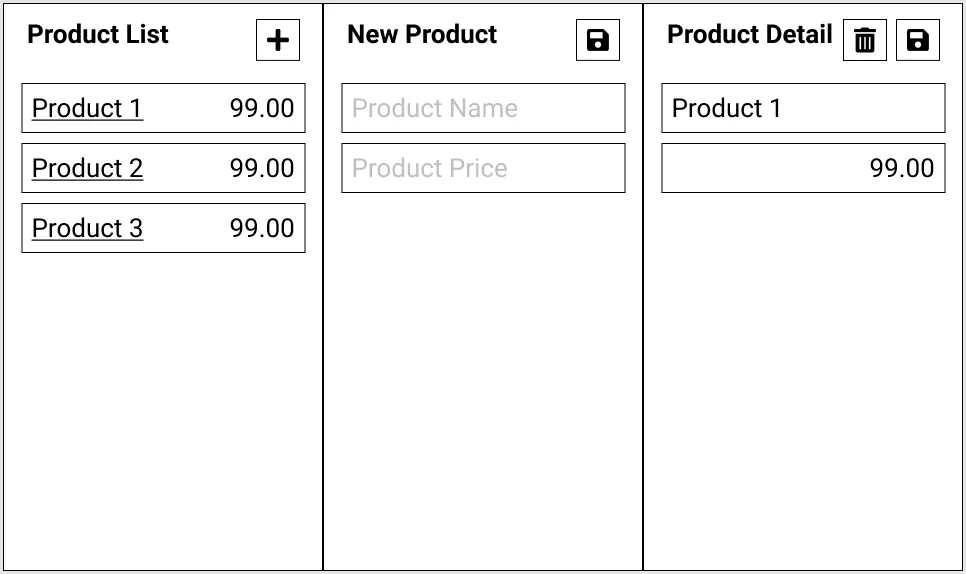
This allows us to delay the thinking of user interfaces until the very end and lets us concentrate on the core, testable inner workings of the interface and the logic behind it.
Let’s illustrate how the views will connect to the backend of the system with the following diagram:
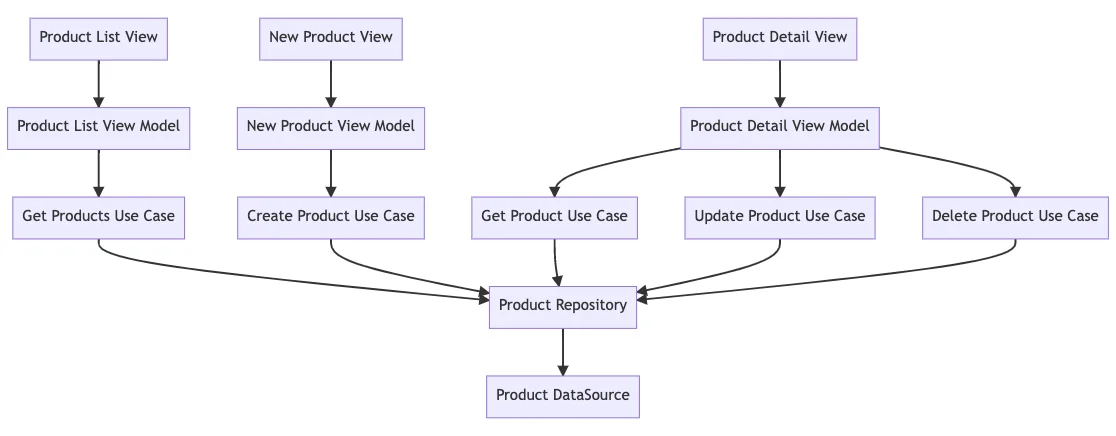
We’ll use React and React Hooks for this project
A good starting point for this React application is to create the groupings (folders) and containers (files) of code:
├─ Data
│   ├─ DataSource
│   │   └─ ProductDataSource.js
│   └─ Repository
│       └─ ProductRepository.js
├─ Domain
│   └─ UseCase
│       └─ Product
│           ├─ GetProducts.js
│           ├─ GetProduct.js
│           ├─ CreateProduct.js
│           ├─ UpdateProduct.js
│           └─ DeleteProduct.js
└─ Presentation
    └─ View
        └─ Product
            ├─ List
            │   ├─ Components
            │   │   ├─ ProductList.js
            │   │   └─ AddButton.js
            │   ├─ View.js
            │   └─ ViewModel.js
            ├─ New
            │   ├─ Components
            │   │   ├─ NameTextField.js
            │   │   ├─ PriceTextField.js
            │   │   └─ SaveButton.js
            │   ├─ View.js
            │   └─ ViewModel.js
            ├─ Detail
            │   ├─ Components
            │   │   ├─ NameTextField.js
            │   │   ├─ PriceTextField.js
            │   │   ├─ UpdateButton.js
            │   │   └─ DeleteButton.js
            │   ├─ View.js
            │   └─ ViewModel.js
            └─ index.js
Product List View
//Presentation/View/Product/List/View.js
import React, { useEffect } from "react"
import useViewModel from "./ViewModel"
import ProductList from "./components/ProductList"
import AddButton from "./components/AddButton"
import { useNavigate } from "react-router-dom";

export default function ProductList() {
    let navigate = useNavigate();
    const {products, getProducts, goToAddProduct, goToProductDetail } = useViewModel();

    useEffect(() => {
        getProducts()
    }, [])

    return (
        <div className="page">
            <div className="header">
                <h2>Product List</h2>
                <AddButton onClick={() => navigate(`/product/new`)} />
            </div>
            <ProductTable data={products} onRowClick={(id) => navigate(`/product/detail/${id}`)} />
        </div>
    );
}
Using react hooks and useEffect, we show how we’ll load the products into the ProductTable on view load.
By simply refactoring the view components into separate files, we can keep the view easy to read and void of implementations.
These components can be developed in isolation and only need to adhere to the interface or touch points specified in the view (e.g. isBusy, onClick, onRowClick, data)
Product List view model
//Presentation/View/Product/List/ViewModel.js
import { useState } from "react"
import getProductsUseCase from '../../Domain/UseCase/Product/GetProducts'

export default function ProductListViewModel() {

    const [error, setError] = useState("");
    const [products, setProducts] = useState([]);

    async function getProducts(){
       const {result, error} = await getProductsUseCase()
       setError(error)
       setProducts(result)
    }

    return {
        products,
        getProducts
    }
}
New Product View and View Model
//Presentation/View/Product/New/View.js
import React, { useEffect } from "react"
import useViewModel from "./ViewModel"
import NameTextField from "./components/NameTextField"
import PriceTextField from "./components/PriceTextField"
import SaveButton from "./components/SaveButton"

export default function NewProduct() {
    const {saveProduct, name, price, onChange } = useViewModel();

    return (
        <div className="page">
            <div className="header">
                <h2>New Product</h2>
                <SaveButton onClick={saveProduct}  />
            </div>
            <div className="form">
                <NameTextField onChange={onChange} value={name} name="name" />
                <PriceTextField onChange={onChange} value={price} name="price" />
            </div>

        </div>
    )
}
//Presentation/View/Product/New/ViewModel.js
import { useState } from "react"
import createProductUseCase from '../../Domain/UseCase/Product/CreateProduct'
export default function NewProductViewModel() {
const [error, setError] = useState("")
const [values, setValues] = useState({
name: "",
price: 0
})
function onChange(value, prop){
setValues({...values, [prop]: value})
}
async function saveProduct(){
const {result, error} = await createProductUseCase(values)
setError(error)
}
return {
...values,
onChange,
saveProduct
}
}Product Detail View and View Model
//Presentation/View/Product/Detail/View.js
import React, { useEffect } from "react";
import { useParams } from "react-router-dom";
import useViewModel from "./ViewModel";
import NameTextField from "./components/NameTextField";
import PriceTextField from "./components/PriceTextField";
import UpdateButton from "./components/UpdateButton";
import DeleteButton from "./components/DeleteButton";

export default function ProductDetail() {
    const { id } = useParams();
    const {name, price, onChange, getProduct, updateProduct, deleteProduct } = useViewModel();

    useEffect(() => {
        getProduct(id)
    }, [])

    return (
        <div className="page">
            <div className="header">
                <h2>Product Detail</h2>
                <DeleteButton onClick={deleteProduct}  />
                <UpdateButton onClick={updateProduct}  />
            </div>
            <div className="form">
                <NameTextField onChange={onChange} value={name} name="name" />
                <PriceTextField onChange={onChange} value={price} name="price" />
            </div>

        </div>
    );
}
//Presentation/View/Product/Detail/ViewModel.js
import { useState } from "react";
import updateProductUseCase from '../../Domain/UseCase/Product/UpdateProduct'
import getProductUseCase from '../../Domain/UseCase/Product/GetProduct'
import deleteProductUseCase from '../../Domain/UseCase/Product/DeleteProduct'
export default function ProductDetailViewModel() {
const [error, setError] = useState("")
const [values, setValues] = useState({
name: "",
price: 0
})
function onChange(value, prop){
setValues({...values, [prop]: value})
}
async function deleteProduct(id){
const {result, error} = await deleteProductUseCase(id)
setError(error)
}
async function getProduct(id){
const {result, error} = await getProductUseCase(id)
setError(error)
setProduct(result)
}
async function updateProduct(){
const {result, error} = await updateProductUseCase(id, values)
setError(error)
}
return {
...values,
onChange,
deleteProduct,
getProduct,
updateProduct
};
}Conclusion:
We decouple the view into isolated view models and refactor our view into a collection of view components we can develop in isolation. This allows all logic to be testable, including view logic.
GitHub Repo: https://github.com/nanosoftonline/clean-mvvm-react