Clean Architecture in SwiftUI 5.5

By employing clean architecture, you can design applications with very low coupling that is independent of technical implementation details. In that way, the application becomes easy to maintain, flexible to change and intrinsically testable. What to follow is a suggestion of how to structure a project in a clean architecture way. We’re going to build an iOS to-do application using SwiftUI. We’ll only illustrate one use case of listing to-dos retrieved from an API.
Let’s get started.
The folder/group structure of the application takes on the following form:
├── Core
├── Data
├── Domain
└── Presentation
Let’s start with the Domain Layer.
This layer describes WHAT your application does. Let me explain, Many applications are built and structured in a way that you cannot understand what the application does just by looking at the folder structure. Using a house building analogy, you can quickly identify the buildings looks and functionality by viewing the floor plan and elevation of the building

In the same way, the domain layer of our application should specify and describe WHAT it does. In this folder, we would use models, repository interfaces, and use cases.
├── Core
├── Data
├── Presentation
└── Domain
    ├── Model
    │   ├── Todo.swift
    │   └── User.swift
    ├── Repository
    │   ├── TodoRepository.swift
    │   └── UserRepository.swift
    └── UseCase
        ├── Todo
        │   ├── GetTodos.swift
        │   ├── GetTodo.swift
        │   ├── DeleteTodo.swift
        │   ├── UpdateTodo.swift
        │   └── CreateTodo.swift
        └── User
            ├── GetUsers.swift
            ├── GetUser.swift
            ├── DeleteUser.swift
            ├── UpdateUser.swift
└── CreateUser.swift- Model: A model typically represents a real-world object that is related to the problem. In this folder, we would typically keep classes to represent objects. e.g. to-do, user, product, etc.
- Repository: Container for all repository interfaces. The repository is a central place to keep all model-specific operations. In this case, the to-do repository interface would describe repository methods. The actual repository implementation will be kept in the Data layer.
- UseCases: Container to list all functionality (business logic) of our application. e.g. Get to-dos, Delete to-do, Create to-do, Update to-do
The PRESENTATION layer will keep all the consumer-related code as to HOW the application will interact with the outside world. The presentation layer can be web forms, Command Line Interface, API Endpoints, etc. In this case, it would be the screens for a List of to-dos and its accompanying view model.
├── Core
├── Data
├── Domain
└── Presentation
    └── Todo
        └── TodoList
            ├── TodoListViewModel.swift
            └── TodoListView.swift
The DATA layer will keep all the external dependency-related code as to HOW they are implemented:
├── Core
├── Domain
├── Presentation
└── Data
    ├── Repository
    │   ├── TodoRepositoryImpl.swift
    └── DataSource
        ├── TodoDataSource.swift
        ├── API
        │   ├── TodoAPIDataSourceImpl.swift
        │   └── Entity
        │       ├── TodoAPIEntity.swift
        │       └── UserAPIEntity.swift
        └── DB
            ├── TodoDBDataSourceImpl.swift
            └── Entity
                ├── TodoDBEntity.swift
└── UserDBEntity.swift- Repository: Repository implementations
- DataSource: All data source interfaces and entities. An entity represents a single instance of your domain object saved into the database as a record. It has some attributes that we represent as columns in our DB tables or API endpoints. We can’t control how data is modelled on the external data source, so these entities are required to be mapped from entities to domain models in the implementations
and lastly, the CORE layer keep all the components that are common across all layers like constants or configs or dependency injection (which we won’t cover)
Our first task would be always to start with the domain models and data entities. Let’s start with the model
import Foundation

struct Todo: Identifiable {
    let id: Int
    let title: String
    let isCompleted: Bool
}
We need it to conform to Identifiable as we’re going to display these items in a list view.
Next let’s do the to-do entity
import Foundation

struct TodoAPIEntity: Codable {
    let id: Int
    let title: String
    let completed: Bool
}
Let’s now write an interface (protocol) for the to-do datasource
import Foundation

protocol TodoDataSource{

    func getTodos() async throws -> [Todo]

}
We have enough to write an implementation of this protocol and call it TodoAPIImpl:
import Foundation

enum APIServiceError: Error{
    case badUrl, requestError, decodingError, statusNotOK
}

struct TodoAPIImpl: TodoDataSource{


    func getTodos() async throws -> [Todo] {

        guard let url = URL(string:  "\(Constants.BASE_URL)/todos") else{
            throw APIServiceError.badUrl
        }

        guard let (data, response) = try? await URLSession.shared.data(from: url) else{
            throw APIServiceError.requestError
        }

        guard let response = response as? HTTPURLResponse, response.statusCode == 200 else{
            throw APIServiceError.statusNotOK
        }

        guard let result = try? JSONDecoder().decode([TodoAPIEntity].self, from: data) else {
            throw APIServiceError.decodingError
        }

        return result.map({ item in
            Todo(
                id: item.id,
                title: item.title,
                isCompleted: item.completed
            )
        })
    }
}
Note: this repository’s getTodos function returns a list of Todo. So, we have to map TodoEntity -> Todo:
Before we write our TodoRepositoryImpl let’s write the protocol for that in the Domain layer
import Foundation

protocol TodoRepository{

    func getTodos() async throws -> [Todo]

}
import Foundation
struct TodoRepositoryImpl: TodoRepository{
var dataSource: TodoDataSource
func getTodos() async throws -> [Todo] {
let _todos = try await dataSource.getTodos()
return _todos
}
}Now that we have our to-do repository, we can code up the GetTodos use case
enum UseCaseError: Error{
    case networkError, decodingError
}

protocol GetTodos {
    func execute() async -> Result<[Todo], UseCaseError>
}

import Foundation


struct GetTodosUseCase: GetTodos{
    var repo: TodoRepository

    func execute() async -> Result<[Todo], UseCaseError>{
        do{
            let todos = try await repo.getTodos()
            return .success(todos)
        }catch(let error){
            switch(error){
            case APIServiceError.decodingError:
                return .failure(.decodingError)
            default:
                return .failure(.networkError)
            }
        }
    }
}
and then write our presentation’s view model and view
import Foundation

@MainActor
class TodoListViewModel: ObservableObject {

    var getTodosUseCase = GetTodosUseCase(repo: TodoRepositoryImpl(dataSource: TodoAPIImpl()))
    @Published var todos: [Todo] = []
    @Published var errorMessage = ""
    @Published var hasError = false

    func getTodos() async {
        errorMessage = ""
        let result = await getTodosUseCase.execute()
        switch result{
        case .success(let todos):
            self.todos = todos
        case .failure(let error):
            self.todos = []
            errorMessage = error.localizedDescription
            hasError = true
        }
    }
}
Note: We use the @MainActor attribute for the view model class because we need to run these functions on the main thread, a singleton actor whose executor is equivalent to the main dispatch queue.
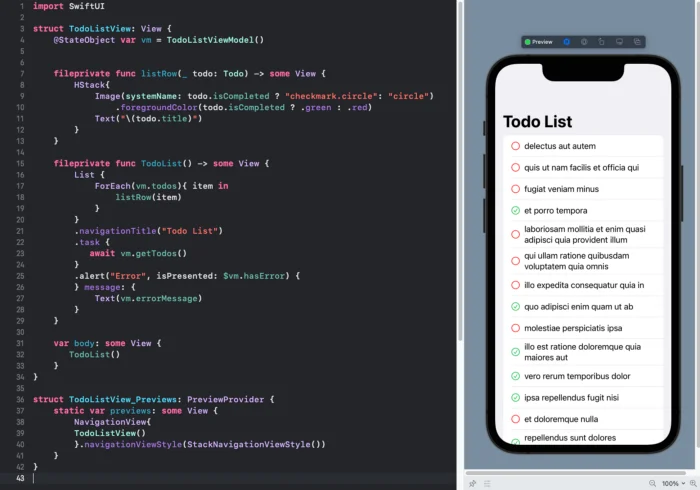
import SwiftUI

struct TodoListView: View {
    @StateObject var vm = TodoListViewModel()


    fileprivate func listRow(_ todo: Todo) -> some View {
        HStack{
            Image(systemName: todo.isCompleted ? "checkmark.circle": "circle")
                .foregroundColor(todo.isCompleted ? .green : .red)
            Text("\(todo.title)")
        }
    }

    fileprivate func TodoList() -> some View {
        List {
            ForEach(vm.todos){ item in
                listRow(item)
            }
        }
        .navigationTitle("Todo List")
        .task {
           await vm.getTodos()
        }
        .alert("Error", isPresented: $vm.hasError) {
        } message: {
            Text(vm.errorMessage)
        }
    }

    var body: some View {
       TodoList()
    }
}

struct TodoListView_Previews: PreviewProvider {
    static var previews: some View {
        NavigationView{
        TodoListView()
        }.navigationViewStyle(StackNavigationViewStyle())
    }
}
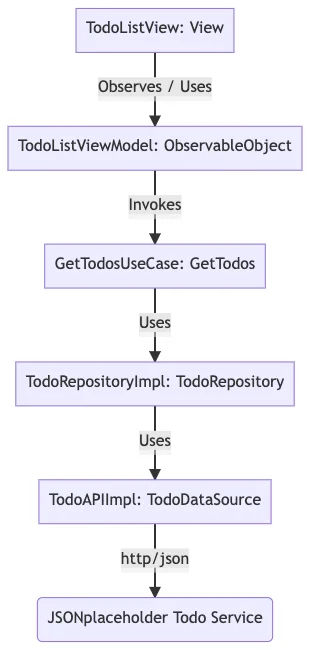
So to recap:
Find code here: https://github.com/nanosoftonline/clean-architecture-swift