Clean Architecture: Android App

By employing clean architecture, you can design applications with very low coupling and independent of technical implementation details. That way, the application becomes easy to maintain and flexible to change. Clean architecture allows us to create architectural boundaries between dependencies which allows components to be intrinsically testable.
What’s to follow is our attempt to build an Android application using clean architecture with TDD. The app will be used to manage and organize contacts.
We are going to structure our application in the following way:
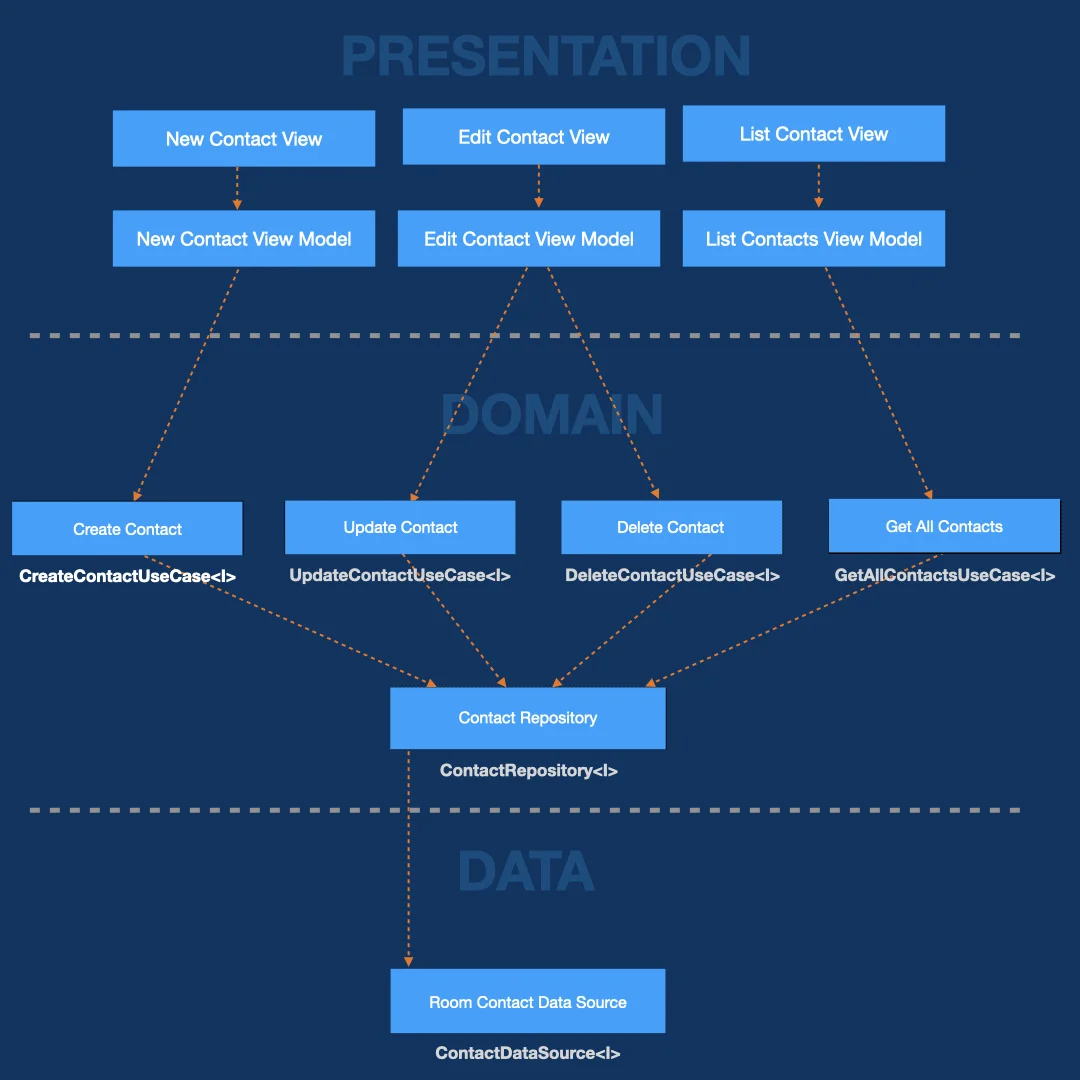
Our application is partitioned into Presentation, Domain and Data Layers.
The Presentation layer is responsible for all consumer facing components like views and view models.
The Domain Layer holds all business Logic (use cases) and System Logic (repositories).
And the Data Layer holds all infrastructure components, like data sources and services.
At specific points in our applications we define dependency rules with interfaces. The architecture of the system is defined by these boundaries that separate components and shows their dependencies. We unit-test every component by mocking its dependencies.
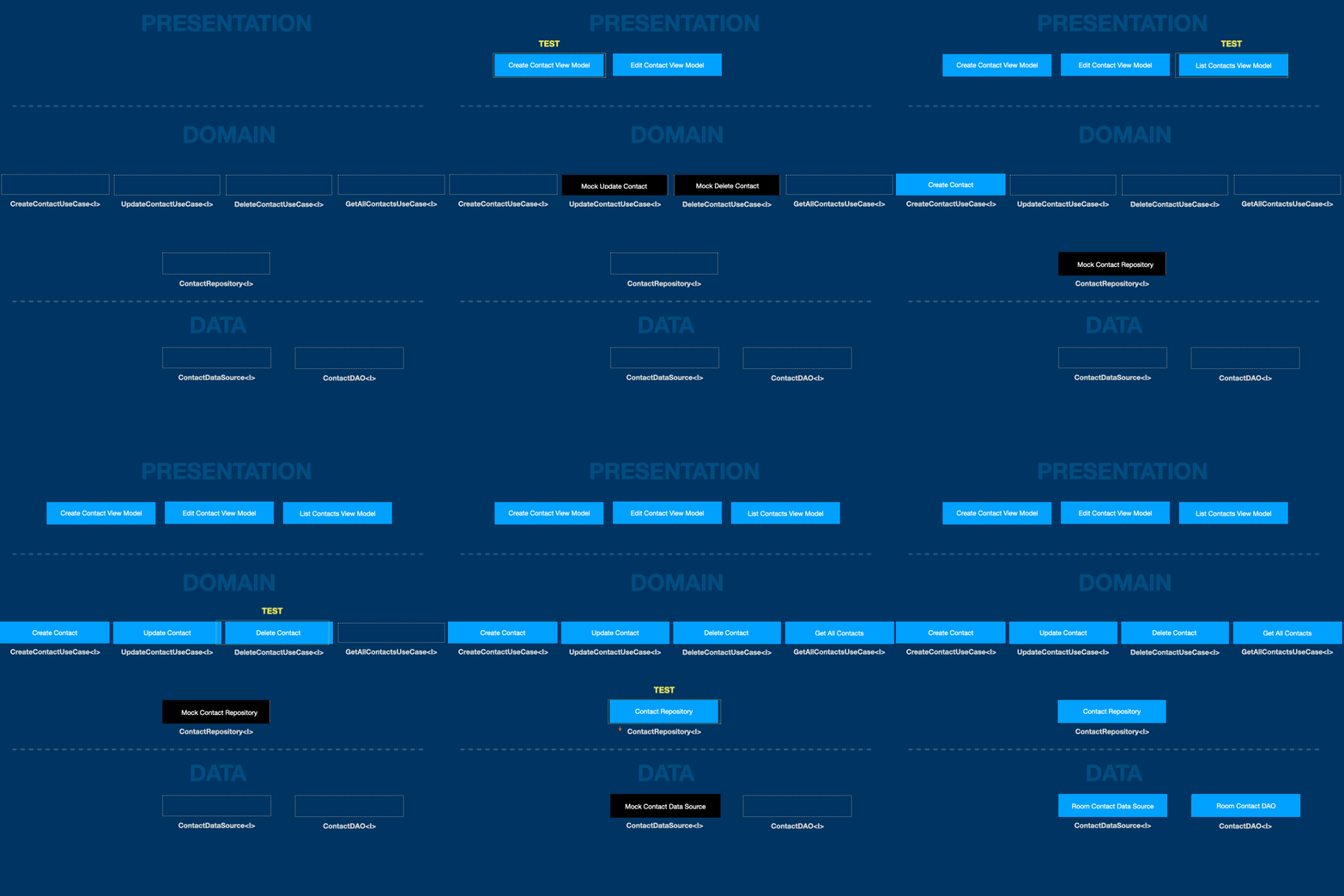
Note: We don’t unit-test our views as they should contain minimal logic to aid in rendering data graphically.
System Structure
We structure the application in the following way to show intent by file / folder structure
│── presentation
│   └── contact
│       ├── create
│       │   ├── CreateContactViewModel.kt
│       │   └── CreateContactView.kt
│       ├── edit
│       │   ├── EditContactViewModel.kt
│       │   └── EditContactView.kt
│       └── list
│           ├── ListContactViewModel.kt
│           └── ListContactView.kt
├── domain
│   ├── interfaces
│   │   ├── usecases
│   │   │   └── contact
│   │   │       ├── CreateContactUseCase.kt
│   │   │       ├── UpdateContactUseCase.kt
│   │   │       ├── DeleteContactUseCase.kt
│   │   │       ├── GetContactUseCase.kt
│   │   │       └── GetAllContactsUseCase.kt
│   │   └── repositories
│   │       └── ContactRepository.kt
│   ├── models
│   │   └── Contact.kt
│   ├── usecases
│   │   └── contact
│   │       ├── CreateContact.kt
│   │       ├── UpdateContact.kt
│   │       ├── DeleteContact.kt
│   │       ├── GetAllContacts.kt
│   │       └── GetContact.kt
│   └── repositories
│       └── ContactRepositoryImpl.kt
└── data
    ├── interfaces
    │   ├── ContactDataSource.kt
    │   └── ContactDao.kt
    └── datasources
        └── room
          ├── entities
          │   └── ContactRoomEntity.kt
          └── RoomContactDataSource.kt
Let’s show an example of a single vertical slice of the application. This slice would be to display a list of contacts on a screen.
Let’s start with the view model.
class ListContactsViewModel constructor(
    private val getAllContactsUseCase: GetAllContactsUseCase
) :
    ViewModel() {
    private val _errorMessage = mutableStateOf("")
    private val _contacts = mutableStateListOf<ContactResponseModel>()

    val errorMessage: String
        get() = _errorMessage.value


    val contacts: List<ContactResponseModel>
        get() = _contacts.toList()

    suspend fun getContacts() {
        try {
            _contacts.clear()
            val list = getAllContactsUseCase.execute()
            _contacts.addAll(list)
        } catch (err: Exception) {
            _errorMessage.value = "Error Fetching Contacts"
            false
        }
    }
}
View Model
This view model has 2 public facing properties:
- The list of contacts (line 12),
- The loading contacts function (line 15), when called, internally updates the state of the view model after data is retrieved.
Use Case
We see the view model has one dependency, the GetAllContactsUseCase, which is constructor injected. Which means we can TDD develop this component by mocking the use case dependency.
All use case classes have one function, the execute function, and is enforced by the following interface:
interface GetAllContactsUseCase {
    suspend fun execute(): List<ContactResponseModel>
}
Data Models
When data travels between different parts of the system, they move to and from the data source in opposite directions. We need to define the shape of that data. In most cases, we need a request model and response model. These models we can define in the contact model file
package za.co.nanosoft.cleancontacts.domain

data class ContactResponseModel(
    val id: Int,
    val name: String
)


data class ContactRequestModel(
    val id: Int? = null,
    val name: String
)
These models will be used throughout the system and will be the conduit for up and down data.
We can further define architectural boundary interfaces for contact repository and contact data source:
ContactRepository
interface ContactRepository {
    suspend fun getContacts(): List<ContactResponseModel>
    suspend fun getContact(id: String): ContactResponseModel
    suspend fun deleteContact(id: String): Boolean
    suspend fun updateContact(id: String, data: ContactRequestModel): Boolean
    suspend fun createContact(data: ContactRequestModel): Boolean
}
ContactDataSource
interface ContactDataSource {
    suspend fun getAll(): List<ContactResponseModel>
    suspend fun getOne(id: String): ContactResponseModel
    suspend fun delete(id: String): Boolean
    suspend fun update(id: String, data: ContactRequestModel): Boolean
    suspend fun create(data: ContactRequestModel): Boolean
}
You get the picture. To follow further, checkout the GitHub which includes tests for all testable components.